|
Tidy Start Menu v 3.4
 Hello,
I use a lot of programs as a software developer and my Start menu used
to be really huge. Once I got tired looking for some program in the menu
and I decided to make my life easier. I thought of the program called
Tidy Start Menu… It has been more than a year now since the program was
released. For this year, the program has been enhanced and it now has a
lot of useful features besides tidying the menu. I will be glad if you
find this program useful. Hello,
I use a lot of programs as a software developer and my Start menu used
to be really huge. Once I got tired looking for some program in the menu
and I decided to make my life easier. I thought of the program called
Tidy Start Menu… It has been more than a year now since the program was
released. For this year, the program has been enhanced and it now has a
lot of useful features besides tidying the menu. I will be glad if you
find this program useful.Also you shuld try my next development and
Start Menu X for professionals.
Dennis Nazarenko |
As time goes by, the list of the programs in
the Start Menu becomes too long. As a result, each time you want to launch a
program, it takes too much time to find it in the menu.
The "Tidy Start Menu" program will help you
to put the menu in order and make your work comfortable.
For setting the menu in order, the program
offers you to categorize the Menu. For example, the Internet programs can be put
into the "Internet" category, while all games can be included in the "Games"
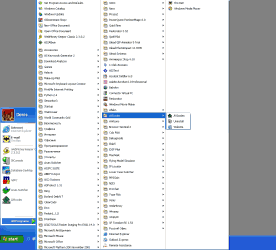
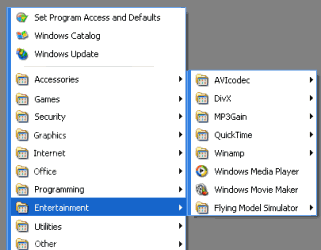
category. Thus, after using the program, you will have a compact menu, which
will contain nothing but categories' names.
Therefore, it will be no trouble to find a necessary program.
All things the program performs can be done manually. However, with the help of
the program, it becomes much easier and handier.
Read More...
Freeware version of the program includes the following features:
- New! Configure the menus for all users of your PC and hide unnecessary programs from your children or employees.
Read More...
- Remove obsolete shortcuts from Start Menu.
Read More...
- Import/Export wizard to XML file
- Backup/Restore start menu wizard
Download a freeware version
(1.09 MB)
You can also purchase an extended version of the program, which includes the
following features:
- New! Start Menu Icon Wizard. Read More...
- Quick Uninstall any program by just right clicking its shortcut. Read More...
- Creation of your own categories
- Free subscription to all new versions of the program
- Priority support
and other useful functions, which are either already available, or will be added
to the future versions.
Purchase Now the extended version ($24.99)
$19.99 with a discount!

|
Before:
After:
 |